PhotoGov Review 2026: Is This the Fastest Compliant Passport Photo Maker?
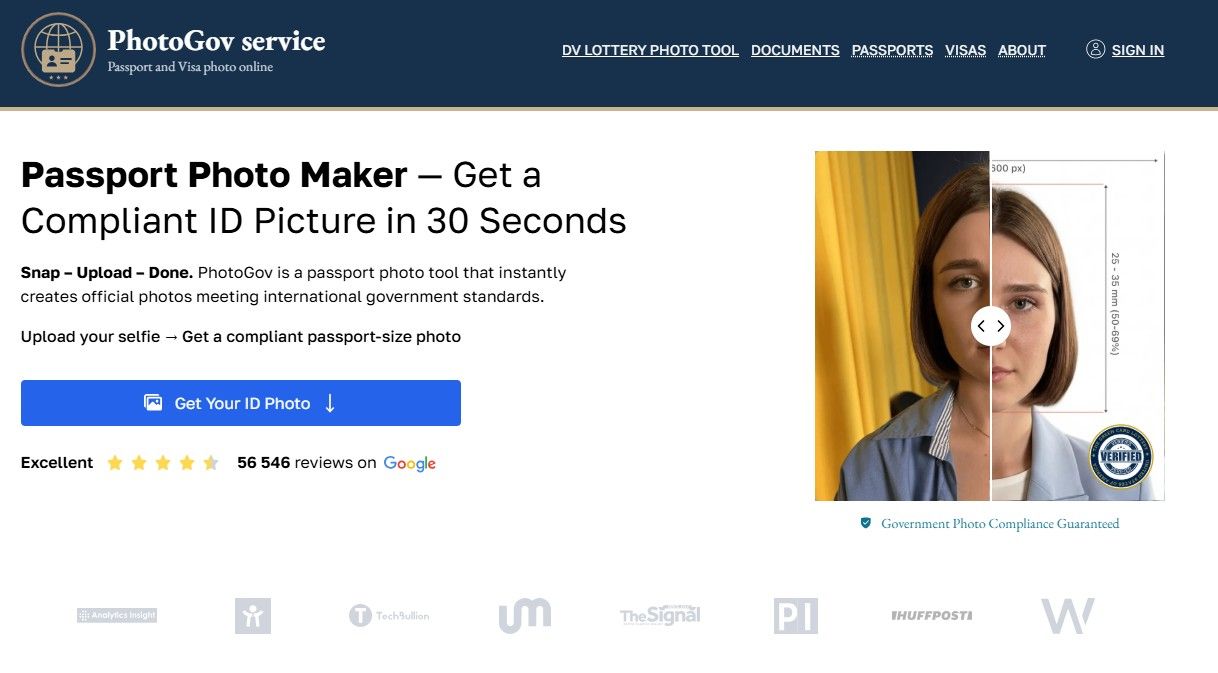
If you've ever handed over $17 at a Walgreens counter for two small prints — only to wonder whether the lighting was off or the crop was right — you've already felt the problem PhotoGov is trying to solve. We tested the app end-to-end: uploaded a selfie, processed a U.S. passport photo, checked the compliance output, and reviewed the pricing against real alternatives. Here's what we actually found, not what the product page says.
What Is PhotoGov?
PhotoGov is a web-based and mobile passport photo service that takes a selfie or uploaded photo and automatically formats it to meet the official requirements of your chosen document type and country. It handles the cropping, resizing, head alignment, and background correction, then delivers a downloadable JPEG or a print-ready 4×6 template — no photographer, no photo booth, and no account required for basic use. The service supports over 900 document types across 136 countries, including U.S. passports, UK passports, Schengen visas, Green Cards, and DV Lottery photos.
How PhotoGov Works — Step-by-Step Walkthrough
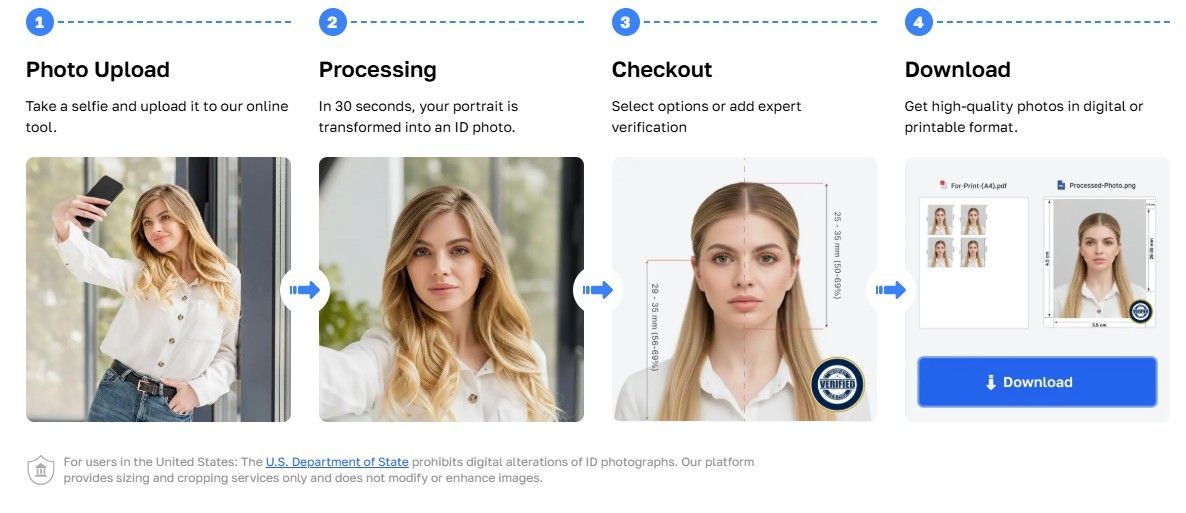
The whole process takes under two minutes on a decent connection. Here's exactly what happens from the moment you open the app to the moment you have a file ready to submit.
Step 1: Open the app or visit the website You can use PhotoGov directly in your browser at any device — phone, tablet, or desktop — or download the app on iOS or Android. No login screen greets you. You land straight on the photo tool, which keeps the friction low if you're in a hurry.
Step 2: Select your country and document type A dropdown menu lets you choose from 136 countries and over 900 document types. Selecting "United States — Passport" automatically locks in the correct specifications: 2×2 inches, white background, head height between 1 and 1⅜ inches, eye line between 1⅛ and 1⅜ inches from the bottom. You don't need to know any of those numbers — the system applies them for you.
Step 3: Upload your photo or take a new one You can upload an existing image from your camera roll or use the in-app camera to take a fresh selfie. The app accepts JPEG, PNG, and HEIF formats, which covers everything a modern smartphone produces. On-screen guidance overlays show you how to frame your face correctly before you shoot.
Step 4: Automated processing runs This is where PhotoGov does its work. The system crops the image to the required dimensions, centers your face, adjusts head positioning, and — for most countries outside the US, UK, and Canada — normalizes the background to a clean white. For U.S., UK, and Canadian documents, the service applies cropping and sizing only, without digitally replacing the background, which keeps it in line with those countries' strict no-digital-alteration rules.
Step 5: Compliance check and result preview Before you can download anything, a built-in compliance engine checks the processed image against the official specifications for your selected document. If something is flagged — a shadow, an off-center crop, insufficient head height — you'll see it on screen with a prompt to retake or re-upload. If everything clears, you get a preview of your compliant photo.
Step 6: Download or add human verification At this point you can download your digital JPEG instantly, or download the print-ready 4×6 template to take to a pharmacy kiosk or home printer. For high-stakes applications, there's an optional human verification add-on at checkout — a trained specialist manually reviews the photo and will reprocess or refund it if it doesn't pass. Once you're done, you can start your application. The whole process, from upload to download, typically takes under 30 seconds.
You can follow these steps yourself at PhotoGov — no account needed to get started.
PhotoGov Pros and Cons
After testing the service across multiple document types, here's an honest breakdown of what works well and where you'll run into limits.
Pros
| ✅ | Detail |
|---|---|
| Wide document and country coverage | 136 countries and 900+ document types in a single tool — U.S. passport, UK passport, Schengen visa, Green Card, DV Lottery, USCIS, driver's license, and more |
| Automated compliance check before download | The system flags issues before you pay or download, reducing the chance of submitting a photo that gets rejected |
| Significantly cheaper than pharmacy service | A digital photo from PhotoGov starts at around $5.90, versus $16.99 for full-service passport photos at Walgreens or CVS — and you can print the 4×6 template yourself at a kiosk for around $0.35–$0.40 |
| Works on any device, no account required | Fully functional on iOS, Android, and any browser; basic use requires no registration and no app download if you prefer the web version |
| No-alteration compliance for US, UK, and Canada | For documents where digital background replacement is prohibited, PhotoGov applies cropping and sizing only — keeping your submission within government guidelines |
| Print-ready template included | The paid option includes a 4×6 multi-copy layout, formatted for standard pharmacy kiosks and home printers |
Cons
| ❌ | Detail |
|---|---|
| Free tier is not reliably available in the US | The free option is region-dependent and rarely surfaces for US-based users; most will go straight to a paid option, which isn't always made clear upfront |
| Output quality depends on your input photo | The compliance engine can flag problems, but it cannot fix a photo taken in harsh shadow, low resolution, or against a busy background — you need a decent source image to get a usable result |
| No physical print delivery | Unlike some competitors, PhotoGov does not mail printed passport photos to your address; you take the digital file to a pharmacy kiosk or print at home yourself |
| Human verification response times vary | The add-on is not instant — multiple user reviews report waits of one to four days, and a small number of cases required multiple resubmission rounds |
PhotoGov Pricing
PhotoGov's pricing is straightforward compared to most competitors, though there are a few nuances worth knowing before you hit checkout.
What You'll Pay
| Tier | Price | What's Included |
|---|---|---|
| Free tier | $0 | 1 photo per day; basic processing only; availability is region-dependent — US users will rarely see this option |
| Single digital photo | From $5.90 | High-resolution JPEG download, sized and cropped to your selected document specs |
| Print-ready 4×6 template | Included with paid photo | Multi-copy layout formatted for pharmacy kiosks and home printers |
| Human verification add-on | $2.90–$4.90 | A trained specialist manually reviews your photo; reprocessed or refunded if it doesn't meet requirements |
| Monthly subscription | $9.90/month | Unlimited premium photo access; suited to frequent travelers, agencies, or anyone processing multiple documents |
| Enterprise / API | Custom | Bulk processing for visa agencies, HR platforms, and government institutions |
How It Compares to the Pharmacy
This is where the value case becomes obvious. A full-service passport photo at Walgreens or CVS runs $16.99 for two 2×2 prints and a digital copy — and that's before you factor in travel time, wait time, and the fluorescent lighting that causes more rejections than most people realize.
| Option | Cost | What You Get |
|---|---|---|
| Walgreens in-store | $16.99 | 2 prints + digital copy; 15-min wait; in-store lighting |
| CVS in-store | $16.99 + $3.99 for digital | 2 prints; digital sold separately |
| PhotoGov digital + pharmacy self-print | ~$6.25–$10.29 total | Compliant JPEG + 4×6 printed at kiosk for $0.35–$0.40 |
| PhotoGov digital only (online submission) | From $5.90 | Compliant JPEG for direct upload to government portal |
For U.S. passport renewals submitted online — where no physical print is required — the digital-only option at $5.90 is the most direct comparison to a $16.99 pharmacy visit. The saving is significant.
One thing to flag: if you add the human verification option, your total rises to roughly $8.80–$14.90 depending on region. That's still below pharmacy pricing, but worth factoring in if you want the extra compliance assurance.
PhotoGov Rating
Here's how PhotoGov scores across the criteria that matter most for a passport photo service.
| Criteria | Score |
|---|---|
| Ease of Use | ⭐⭐⭐⭐½ — 4.5 / 5 |
| Compliance Accuracy | ⭐⭐⭐⭐½ — 4.5 / 5 |
| Speed | ⭐⭐⭐⭐⭐ — 5.0 / 5 |
| Price / Value | ⭐⭐⭐⭐½ — 4.5 / 5 |
| Customer Support | ⭐⭐⭐½ — 3.5 / 5 |
| Overall | ⭐⭐⭐⭐— 4.4 / 5 |
Speed earns a perfect score — under 30 seconds from upload to download is genuinely fast for a compliance-checked document photo. Support scores lower because the human verification add-on, while useful, has a track record of inconsistent response times based on real user feedback. Everything else lands solidly in the 4.5 range.
Who Is PhotoGov Best For?
PhotoGov works well across a range of situations, but it's particularly strong for three types of users.
First-time passport applicants. If you've never navigated the passport photo process before, the combination of on-screen guidance, automatic compliance checking, and instant feedback makes PhotoGov one of the least stressful ways to get it right. You don't need to know what "head height between 1 and 1⅜ inches" means in practice — the system handles the measurement and tells you if something is off before you spend a dollar. For a first-timer who doesn't want to make two trips to a pharmacy because the first photo was rejected, that upfront compliance check is genuinely useful.
Frequent travelers and multi-document applicants. If you're applying for a U.S. passport renewal, a Schengen visa, and a UK entry document within the same year — each with different size and background requirements — switching between document types in PhotoGov takes about ten seconds. The 136-country, 900-document coverage means you're unlikely to hit a format it doesn't support. At $5.90–$9.90 per photo rather than $16.99 per pharmacy visit, the savings add up quickly across multiple applications.
Parents getting passport photos for infants and young children. Baby and toddler passport photos are notoriously difficult — open eyes, neutral expression, white background, no parent visible in frame. PhotoGov's guided overlay and retake prompts help you work through the positioning without the pressure of a photographer or a pharmacy counter. You can take as many attempts as you need before you pay, which makes a genuinely frustrating process considerably more manageable.
How PhotoGov Compares to Competitors
PhotoGov isn't the only option in this space, and two services come up consistently in comparisons: PhotoAiD and Visafoto. Here's how they stack up on the criteria that actually affect your experience.
| Feature | PhotoGov | PhotoAiD | Visafoto |
|---|---|---|---|
| Compliance standard (US) | ✅ State Dept. / ICAO | ✅ ICAO | ✅ ICAO |
| Processing speed | ~30 seconds | ~3 seconds | ~2–5 minutes |
| Free tier available | ✅ Region-dependent | ❌ | ❌ |
| Price (digital, US passport) | From $5.90 | ~$9.95–$14.99 | ~$7.00 |
| Human expert review | ✅ Optional add-on | ✅ Included in paid | ❌ |
| Physical print delivery | ❌ | ✅ (~+$3.00) | ❌ |
| Mobile app (iOS + Android) | ✅ | ✅ | ❌ Web only |
| Countries supported | 136 / 900+ docs | 120+ countries | ~60–70 countries |
| No account required | ✅ | ❌ | ✅ |
A few things are worth calling out honestly. PhotoAiD is genuinely faster at automated processing — three seconds versus PhotoGov's thirty — and it's one of the few services that will mail physical printed photos to your door, which matters if you need paper prints and don't want to visit a pharmacy. Its included human verification also means you're getting expert review built into the price rather than as an add-on. If physical delivery or the fastest possible turnaround is your priority, PhotoAiD has a real edge there.
Visafoto is a solid, no-frills option for users who need a straightforward digital photo at a mid-range price point and are comfortable with a web-only workflow. Its main drawback is the absence of any human review or compliance guarantee in the base offering, and its country coverage is noticeably narrower than PhotoGov's.
Where PhotoGov wins is on price for the base digital option, the breadth of country and document coverage, the no-account access, and the mobile app availability on both platforms. For most US-based users who just need a compliant digital photo for an online passport renewal or visa application — and have no need for physical prints delivered to their door — PhotoGov covers the job at the lowest cost of the three.
Final Verdict
PhotoGov does what it promises, and it does it quickly. For the majority of users — someone renewing a U.S. passport online, applying for a visa, or just trying to avoid a $17 pharmacy trip — the experience is fast, affordable, and genuinely low-friction. Upload a decent selfie, let the compliance engine do its work, download your JPEG, and you're done in under a minute. At $5.90 for a compliant digital photo, the value case against full-service pharmacy pricing is hard to argue with.
The limitations are real but specific. If you need physical prints mailed to your door, PhotoGov isn't the right tool — you'll need to take the file to a kiosk yourself or print at home. If you're relying on the human verification add-on for a time-sensitive application, build in some buffer; response times are not always same-day. And if you're starting with a poorly lit or low-resolution photo, no compliance engine will fully rescue it — the quality of your output is tied to the quality of your input.
That said, for the use case it's designed for — fast, compliant, affordable document photos from your phone — PhotoGov earns its place as one of the strongest options available in 2026.
Overall rating: 4.4 / 5
Frequently Asked Questions
Is PhotoGov legit?
Yes. PhotoGov is an independent private service — not affiliated with any government agency despite the name — with over 1.8 million users across 150 countries and a 4.7-star average rating drawn from more than 3,000 reviews. It is not a scam, but it's worth being clear on what it is: a photo formatting and compliance-checking tool. Final acceptance of any passport photo always rests with the issuing authority, whether that's the U.S. Department of State, HM Passport Office, or another national agency. PhotoGov prepares your photo to meet their specifications — it doesn't guarantee acceptance on its own, and no private service legitimately can.
Does PhotoGov work for UK passports?
Yes. PhotoGov supports HM Passport Office (HMPO) standards for UK passport photos. As with U.S. documents, UK passport photos cannot have their background digitally replaced — PhotoGov applies cropping and sizing only for UK submissions, which keeps the output within HMPO guidelines. The result is a correctly dimensioned, properly cropped photo that meets the technical requirements for a UK passport application.
How long does PhotoGov take?
The automated processing — from upload to downloadable photo — takes under 30 seconds in normal conditions. If you add the optional human verification service at checkout, expect a longer wait; the add-on is reviewed by a trained specialist rather than processed automatically, and while same-day turnaround is common, some users have reported waits of one to four days. If your application has a hard deadline, either allow extra time for the human review or use the automated output and skip the add-on.
Is PhotoGov free?
Partially, and it depends on where you are. PhotoGov offers a free tier that allows one processed photo per day, but availability is region-dependent and US-based users will generally encounter the paid option without a free alternative being offered. A single paid digital photo starts at around $5.90, which is still significantly less than passport photo services at Walgreens or CVS. The free tier, where available, includes basic processing without the print-ready template or priority download.
Can I use PhotoGov for a Green Card or DV Lottery photo?
Yes. Green Card and DV Lottery photo formats are explicitly supported, along with USCIS immigration photos and a range of other U.S. government document types. The DV Lottery in particular has specific technical requirements — 600×600 pixels minimum, JPEG format, file size between 240KB and 240KB — and PhotoGov's compliance engine applies those specs automatically when you select the correct document type. As always, verify the latest requirements directly on the relevant government website before submitting, as specifications can be updated between application cycles.